The Philippine Statistics Authority (PSA) continues its aggressive ePhilID rollout, giving millions of Filipinos immediate access to their credentials. If you have been waiting for your physical card, securing your ePhilID download is the absolute fastest way to get your legally valid identification.
The Digital National ID (ePhilID) can be officially accessed and downloaded right now through the eGovPH App or the official PhilSys portal. Registered individuals can easily secure their National ID digital copy download PDF, which is fully valid for all public and private transactions. This guide will walk you through the exact process while ensuring you safely avoid fake websites and scams.
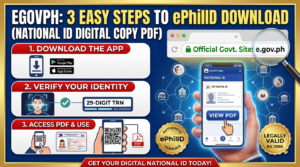
📥 How to Download Your Digital National ID (ePhilID)
Before you begin your ePhilID download, make sure you have your transaction slip ready. Follow these 3 easy steps to generate your digital copy securely.
Access the Official Portal
Visit the official government site at national-id.gov.ph or use the official eGovPH App on your smartphone. Do not click on unofficial Facebook links to avoid phishing.
Verify Your Information
Enter your 15-digit Transaction Reference Number (TRN). You can find this strictly on the registration slip given to you during your biometric capture. If you lost it, check our guide on lost National ID slips.
Download the Digital Copy PDF
If your record is successfully matched and available, the system will prompt you. You can then proceed with your National ID digital copy download PDF. Save this file securely on your mobile device or computer.
⚠️ Important ePhilID Download Details
Many Filipinos are unsure how to properly use their digital file after their ePhilID download. Here are the crucial details you must understand regarding its usage.
✅ Legal Validity
The digital ID is a highly valid government-issued ID under Republic Act No. 11055. It possesses the exact same functionality, weight, and acceptance as the physical PVC card.
🌐 Alternative Appointment Option
If you prefer a printed copy directly from a PSA PhilSys center, you can check availability and book an appointment online at ephilid.philsys.gov.ph.
🔍 QR Code Validation
Every downloaded PDF contains a unique, non-tamperable QR code. Banks and agencies can easily authenticate your identity via verify.philsys.gov.ph without needing internet on your end.
🛡️ High-Level Security
The PSA reminds the public to avoid unofficial apps or fake websites. The official National ID digital copy download PDF system is heavily encrypted to protect your data privacy.
Frequently Asked Questions (People Also Ask)
Is the National ID digital copy download PDF free?
Yes. The Philippine government provides the digital copy entirely free of charge. There are absolutely zero fees required to generate, download, or print your ePhilID.
Can I print my downloaded ePhilID PDF?
Absolutely. Once you secure your National ID digital copy download PDF, you can print it on standard paper. You may choose to laminate the printed copy for durability. Even a printed black-and-white copy is still valid, provided the QR code remains readable by scanners.
Why is my ePhilID not yet available for download?
If the portal states your record is not yet found, it means your biometric data is still undergoing backend processing and deduplication. You can consistently track your National ID status online until it finally becomes available.
What is the ePhilID PhilSys gov PH login?
There is no traditional “login” with a username and password for the basic download portal. You simply use your Transaction Reference Number (TRN) and your demographic details (like your Date of Birth) to authenticate your ePhilID download.
People Also Search For
- ePhilID PhilSys gov PH login
- National ID digital copy
- National ID digital copy download PDF
- Download National ID
- ePhilID download PDF
- How to get ePhilID
- Www register PhilSys gov PH online registration
- National ID online