Are you dealing with frustrating National ID problems? You are certainly not alone. Since the rollout of the Philippine Identification System (PhilSys), many Filipinos have encountered various hurdles—from severe delays in physical card delivery to biometric verification failures.
The good news is that the Philippine Statistics Authority (PSA) has continuously improved its systems. In 2026, most of these National ID problems can be resolved instantly using the Digital National ID via the eGovPH app or by reaching out to designated support channels.
Below, we cover the top 7 most common issues and provide proven, step-by-step solutions to help you secure your valid proof of identity without the headache.
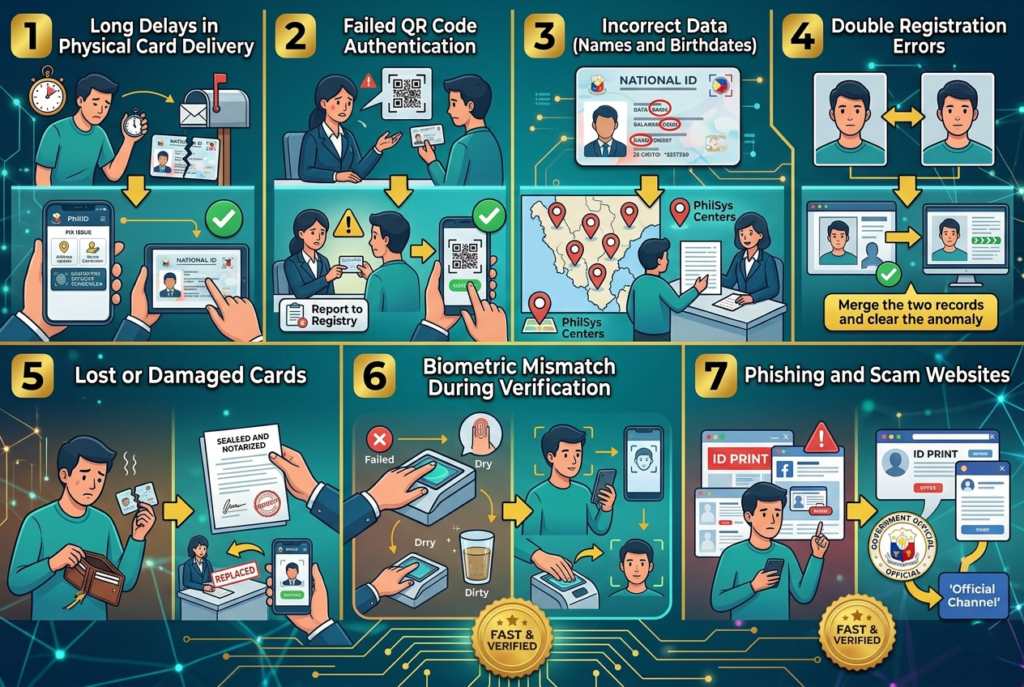
Top 7 National ID Problems and Instant Solutions
Resolving your issues is much easier when you know exactly what to do. Here are the most frequently reported National ID problems and how you can fix them today.
⏳ 1. Long Delays in Physical Card Delivery
The Problem: You registered months or years ago but haven’t received your PVC card.
The Solution: Do not wait blindly. You can actively track your National ID delivery status using your Transaction Reference Number (TRN). In the meantime, immediately generate your Digital National ID through the eGovPH app. This digital alternative holds the exact same validity as the physical card.
❌ 2. Failed QR Code Authentication
The Problem: Establishments or banks cannot read your PhilID QR code.
The Solution: The PSA advises scanning the QR code at least three times under good lighting. If the error persists, check if the agency’s verification application is updated. For persistent authentication errors, report the issue directly to the PSA-PhilSys Registry Office.
✏️ 3. Incorrect Data (Names and Birthdates)
The Problem: Your printed card or digital profile has misspelled names or the wrong birthdate.
The Solution: Demographic corrections cannot be done purely online. You must visit a physical PhilSys Registration Center. If you are unsure where to go, check our guide on how to apply for National ID Philippines to find the nearest registration hub.
⚠ 4. Double Registration Errors
The Problem: You registered twice because you thought your first application was lost.
The Solution: The PSA strictly warns against multiple registrations. If you have duplicate records, the backend system will flag them. Usually, the automated biometric matching system merges or clears the duplicate data. Wait for the PSA to process the anomaly.
🆔 5. Lost or Damaged Cards
The Problem: You misplaced your PhilID or the PVC card was physically damaged.
The Solution: You must execute a notarized Affidavit of Loss. Once secured, you can request a replacement card at designated PSA offices. While waiting for the replacement, rely entirely on the digital version accessible on your smartphone.
👤 6. Biometric Mismatch During Verification
The Problem: Your fingerprint or iris scan is failing during bank transactions.
The Solution: Ensure that the scanner glass is clean and your fingers are dry. If biometric National ID problems continue, use the National ID eVerify tool—a secure alternative that utilizes facial recognition via your mobile device.
How to Bypass National ID Problems with the Digital ID
The fastest and most efficient way to avoid physical card delays and delivery issues is to transition to the digital format.
Download the eGovPH App
Available on Google Play and the Apple App Store. This is the official super app of the Philippine government designed to centralize your records.
Verify Your Identity
Create an account and undergo the standard KYC (Know Your Customer) process. This involves a live selfie face scan to securely match your biometrics.
Access Your ePhilID
Once verified, your digital ID will be available in the app. You can present this screen to any bank or government agency. For more official verification procedures, visit the external portal at e.gov.ph.
📞 Still Experiencing National ID Problems? Contact PSA
If you have escalated issues that cannot be solved online, you must contact the authorities directly. Reach the PhilSys Hotline by dialing 1388 or sending an email to info@philsys.gov.ph.
People Also Search For
- How can I check my National ID online
- National ID registration
- National ID digital copy
- National ID tracking QR code
- Download National ID