Correcting information on a Philippine National ID (PhilID) involves updating your vital demographic data within the Philippine Identification System (PhilSys). Because the PhilID is a highly restricted security document, making changes requires formal, in-person validation at a PSA registration center to ensure the absolute accuracy of the national registry.
If you have found a typo or simply need to update your marital status, this complete National ID Correction Guide will walk you through the exact requirements and procedures to fix your ID without the hassle.
How to Fix Wrong Name or Details on Your National ID Correction 2026
📋 When Should You Correct Your National ID?
Before proceeding with an update, it is crucial to know if your issue qualifies. According to PhilSys, you should immediately use this National ID Correction Guide if you experience any of the following scenarios:
✍️ Typographical Errors
This includes misspelled first or last names, an incorrect birthdate, or a wrong residential address printed on your physical card or showing on your digital profile.
💍 Status Changes
If you recently transitioned from single to married and need to legally process a change of surname to match your other active IDs and documents.
🏚️ Damaged IDs
If you received a defective card, such as one with peeled-off photos, severe scratches on the QR code, or a completely broken PVC card.
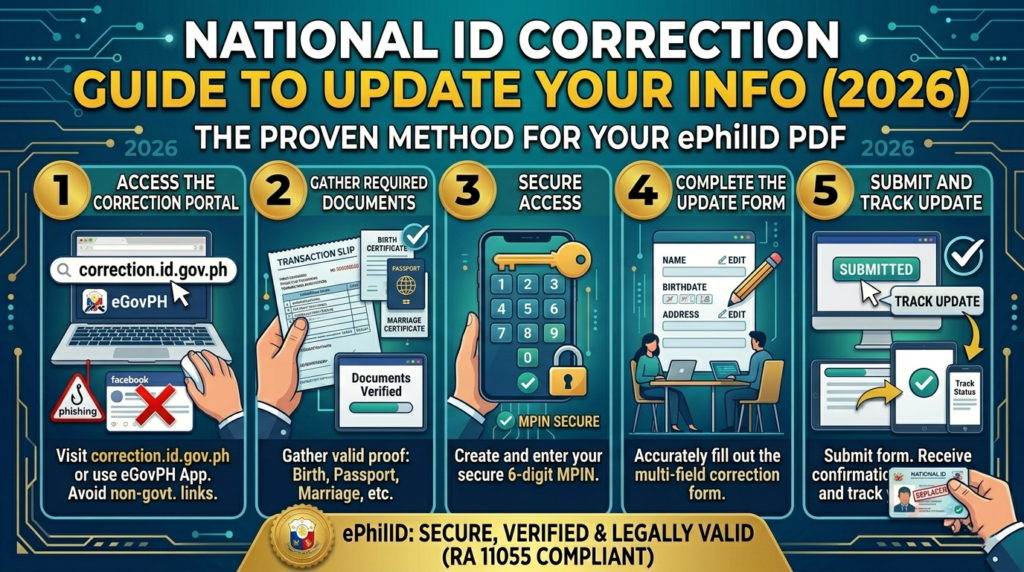
🛠️ Step-by-Step National ID Correction Guide
Ready to update your information? Follow these exact steps to ensure a smooth transaction at the registry.
Visit a PhilSys Registration Center
Go to the nearest PSA RSSO/PSO, mall-based registration center, or LGU-based registration center. You do not need to register again because your PhilSys Number (PSN) is permanent.
Fill Out the Request Form
Request a Data Update Form (DUF) or Transaction Form from the officer. Clearly indicate the specific correction needed (e.g., Name, Date of Birth, Address).
Submit Supporting Documents
Bring the original and photocopies of documents that prove the correct information. For Name/Birthdate Corrections, bring your PSA Birth Certificate. For a Married Surname, bring your PSA Marriage Certificate. For Address Changes, bring a Barangay Clearance or Utility Bill.
Biometric Re-authentication
Personnel will strictly verify your identity through your photograph, fingerprints, or iris scan to ensure you are the legitimate owner of the PSN.
Surrender Old ID (If Required)
If your ID is simply damaged or you are requesting a corrected physical reprint, you will be required to surrender the old, defective card to the staff.
Wait for Processing
The PSA will verify your documents, which may take a few weeks. You will be notified when your updated National ID is ready. In the meantime, you can rely on your Digital National ID.
📱 How to Update Address/Photo via eGovPH App
Minor Updates Can Be Done Online
If you are already registered and verified, you do not always need to visit a center. You can effectively use the official eGovPH app to quickly update minor details like your current address, digital signature, and profile photo without leaving your home.
⚠️ Important Correction Reminders
Keep these final warnings in mind before initiating your correction request.
⚠ Replacement Fee: A fee of ₱100–₱500 might be strictly required for lost cards. However, replacement due to PSA errors (damaged/peeled-off photos) is often completely free.
⚠ Discrepancy in Records: If the error is actively on your birth certificate, you must fix the PSA certificate first through a Petition for Correction of Entry before updating PhilSys.
⚠ Protect Your Data: Only fill out forms at official PhilSys registration centers. Do not trust third-party, non-PSA websites or fixers for corrections. For official announcements, visit philsys.gov.ph.
Disclaimer: The information in this National ID Correction Guide is based on the current procedures for the Philippine Identification System as of early 2026. Policies may change.
Frequently Asked Questions (People Also Ask)
How to correct National ID errors in the Philippines?
You must physically visit a PSA PhilSys Registration Center, fill out the Data Update Form (DUF), and submit the corresponding original supporting documents (such as your PSA Birth Certificate) for manual validation.
Can I edit my National ID information?
Yes. However, major demographic edits like changing your name or birthdate require an in-person visit to a registration center. Minor edits like your current address or profile photo can be done securely via the eGovPH app.
How to change National ID in Philippines?
If you need to change your status (e.g., from Single to Married) and update your surname, you must provide your official PSA Marriage Certificate to the Registration Kit Operator during your update appointment.
How do I update a National ID?
Simply follow our National ID Correction Guide: secure your supporting documents, head to your local mall-based or LGU-based registration center, undergo biometric re-authentication, and submit your update request.
People Also Search For
- Update address National ID
- Change surname National ID Philippines
- National ID replacement fee 2026
- Wrong birthdate National ID
- PhilSys registration center near me