The massive transition to the Digital National ID Philippines has completely revolutionized how Filipinos prove their identity. Governed closely by the Philippine Identification System (PhilSys), the national ID is no longer just a physical PVC card you wait months to receive—it is now a dynamic, instantly accessible digital credential.
Whether you need to quickly open a bank account, apply for a passport, or seamlessly claim government benefits, having your digital copy ready is incredibly powerful. This comprehensive guide covers everything you absolutely need to know about securing and utilizing your Digital National ID Philippines.
🌐 What is a Digital National ID?
The Official Digital Counterpart
The Digital National ID Philippines (often referred to interchangeably as the ePhilID) is the official electronic equivalent of your physical PhilSys card. Mandated by Republic Act No. 11055, it uniquely holds the exact same legal validity as the physical version.
It contains your vital demographic data, a front-facing photograph, and a highly secure QR code that banks and institutions use to validate your identity instantly without requiring an active internet connection on your device.
📥 How to Download Digital National ID
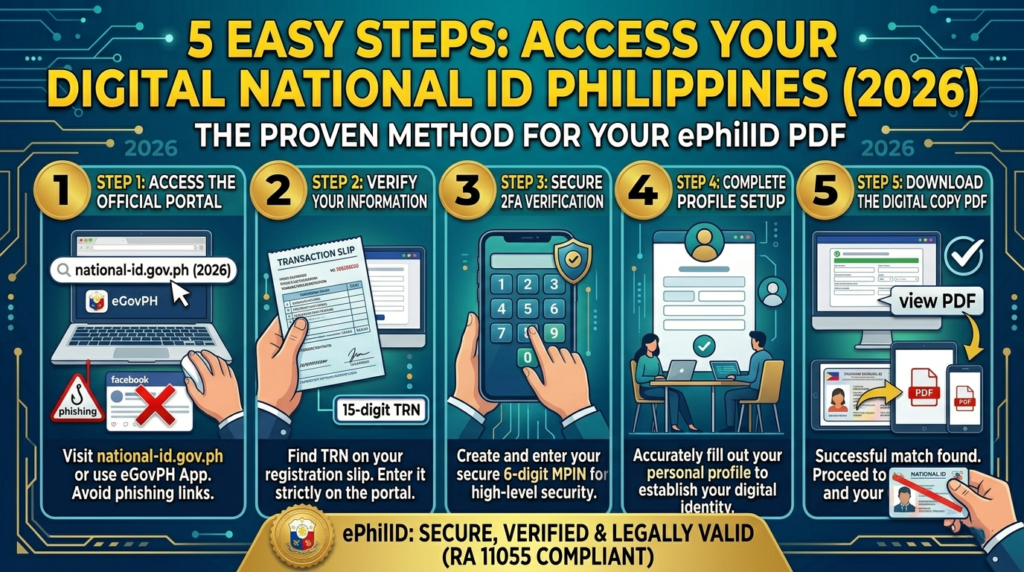
Accessing your digital credential is straightforward if you have your Transaction Reference Number (TRN) ready. Follow these easy steps to quickly secure your copy.
Visit the Official Link
Go directly to the official National ID digital copy link or use the official eGovPH mobile application.
Enter TRN and Details
Input your 15-digit TRN from your registration slip, alongside your basic demographic information (like your Date of Birth) to securely authenticate your identity.
Download PDF
Once successfully verified, click the prompt to initiate the National ID digital copy download PDF. Save this file securely on your mobile device for offline use.
🖨️ Where Can I Print ePhilID?
Many Filipinos wonder if a physical printout is necessary or allowed. The answer is yes.
🏠 Print at Home
Because your Digital National ID Philippines comes as a standard PDF file, you can easily print it right at home using a standard printer. A simple black-and-white copy on bond paper is perfectly valid as long as the printed QR code remains clear.
🏢 Official PhilSys Centers
If you prefer a standardized, professionally printed version, you can confidently book an appointment online to have it printed for free at designated PSA PhilSys Registration Centers nationwide.
🔍 How Can I Check My National ID Status Online?
If your digital record isn’t showing up on the portal yet, you might still be in the backend processing and deduplication queue. You can easily check your National ID status online by visiting the official tracking portal and entering your TRN. The tracker will clearly tell you if your ID is currently “Printed”, “Dispatched”, or successfully “Delivered”.
Frequently Asked Questions (People Also Ask)
How to download digital National ID?
You can securely download it by entering your Transaction Reference Number (TRN) on the official PhilSys portal or by verifying your face biometrics via the eGovPH mobile application. Review our Download Guide for a full walkthrough.
Where can I print ePhilID?
You can flexibly print your downloaded ePhilID at home on standard bond paper, or you can book an official appointment to have it cleanly printed at any designated PSA PhilSys Registration Center near you.
What is a digital National ID?
It is the electronic and completely valid counterpart of your physical PVC PhilSys card, accessible instantly via your smartphone and formally recognized by all government and private institutions.
How can I check my National ID status online?
Use the official PHLPost tracking portal or the PhilSys tracking system by inputting the TRN found on your registration slip. This will actively update you on both your physical and digital ID availability.