- How to Check Your Passport Application Status Philippines: Two Reliable Methods
- Understanding Your Passport Status: What Each Label Means When You Check
- How to Check Your Passport Application Status Philippines: Typical Processing Timelines
- What to Do If Your Status Hasn't Updated or Release Is Delayed
- Pickup vs. Delivery: What You Need to Know
- Final Reminders: You're Almost There
How to check passport application status Philippines is the question that keeps most applicants up at night. You’ve submitted your passport application, paid the fees, and now comes the hardest part—the waiting. Every day you wonder, “Approved na kaya? Kailan ko kaya makukuha?”
Totally normal ‘yan. The good news is you don’t have to wait in the dark. The Department of Foreign Affairs (DFA) has made it fairly simple to track your passport status online. This guide will walk you through the entire process of how to check your passport application status Philippines, so you know exactly what’s happening with your application and when you can expect that shiny new passport in your hands.
How to Check Your Passport Application Status Philippines: Two Reliable Methods
There are two reliable ways to track your passport. Both are official, and both will give you the same information. Let’s walk through each method so you can choose what works best for you.
Method 1: The DFA Passport Tracking Portal (Fastest Way)
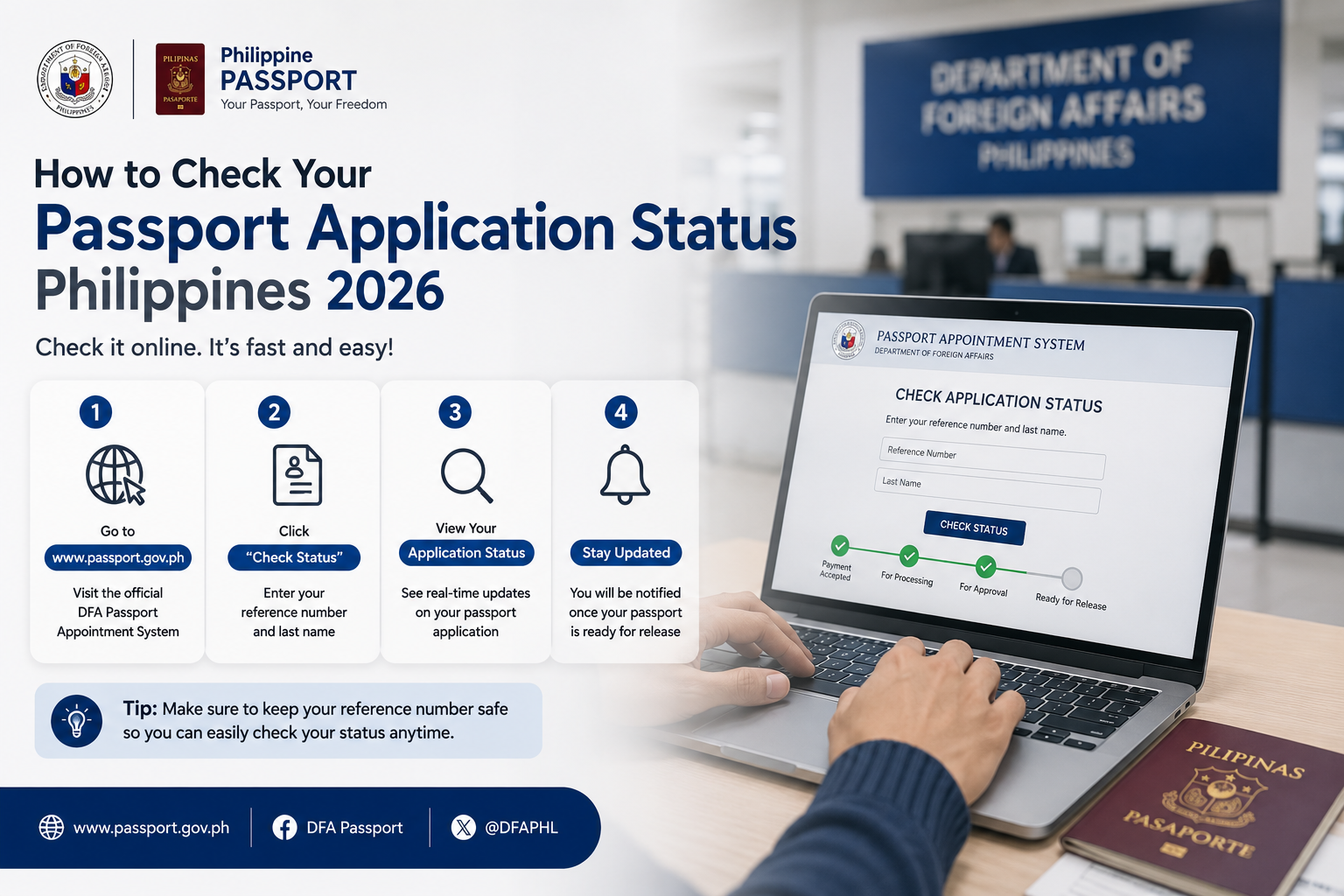
This is the most direct answer to how to check your passport application status Philippines. Here’s exactly what you do:
- Go to the official DFA Passport Tracking website at passport.gov.ph/tracking
- Enter your application reference number (you’ll find this on the receipt you got at the DFA appointment).
- Type in your last name exactly as it appears on your application form.
- Enter the captcha code shown on the screen.
- Click “View Status”.
That’s it. The screen will show your current passport status immediately. For a full walkthrough on securing valid identification before travel, check our guide on the National ID for Passport Application.
Method 2: DFA Email Inquiry (Backup Option)
If the portal isn’t working for you—it happens occasionally, especially during peak hours—you can email the DFA directly. Send your full name, application reference number, and date of birth to the official DFA consular office email listed on their official contact page. Just be prepared: this route takes longer to get a response, usually 2-3 working days.
Pro tip: Screenshot or save your tracking results the first time you check. It saves you from repeatedly typing in your details every time anxiety strikes at 2 AM.
National ID for Passport Application Philippines 2026 Guide
Understanding Your Passport Status: What Each Label Means When You Check
When you learn how to check your passport application status Philippines, the next step is understanding what you’re actually reading. Some labels can be confusing. Let’s decode them in plain language:
| Status You’ll See | What It Really Means |
|---|---|
| For Processing | Your application is still in the queue. The DFA has received your documents, but it’s currently being reviewed, verified, or queued for printing. This is normal for the first few days after your appointment. |
| For Printing | Your application has been approved! Your passport booklet is now being printed. You’re nearly there—this is the status you want to see. |
| For Dispatch/For Delivery | Your passport has been printed and is now in the hands of the courier. If you chose delivery, your passport is on its way to your doorstep. |
| Ready for Pickup | If you opted for pickup, this is the status you’re waiting for. Your passport is physically at the DFA office and ready to be claimed. |
| On Hold/For Review | This is the one nobody wants to see. It means there’s an issue with your application—possibly a name match problem, a missing supporting document, or an issue with your PSA birth certificate. Don’t panic, but do follow up. |
| Cancelled/Disapproved | This is rare. It happens when there’s a discrepancy that couldn’t be resolved or the applicant doesn’t meet requirements. You’ll need to reapply or contact DFA directly for the specific reason. |
How to Check Your Passport Application Status Philippines: Typical Processing Timelines
Understanding the timeline helps you set realistic expectations when you check your status. Here’s how it usually goes in 2026:
| Application Type | Regular Processing | Express Processing |
|---|---|---|
| New Application | 12 to 15 working days | 7 working days |
| Renewal | 10 to 15 working days | 5 to 7 working days |
| Lost/Mutilated Passport | 15 working days (plus 15 days for verification period mandated by law) | Not always available; depends on the consular office |
Important note: These are working days, not calendar days. Weekends and holidays don’t count. So if you applied on a Monday with regular processing, the earliest you’ll likely see movement is around the third week after your appointment.
While waiting for your passport, make sure your other identification documents are ready. Our How to Get Your Digital National ID guide walks you through getting a valid government ID you can use immediately.
What to Do If Your Status Hasn’t Updated or Release Is Delayed
It’s been 15 working days and your status still says “For Processing.” Now what?
Take a breath—this is more common than you’d think, especially during peak application seasons like summer and the ber months. Here’s your game plan when how to check your passport application status Philippines leaves you with no update:
- Wait two extra working days. Sometimes the system just isn’t updated in real time. Your passport could already be printed while the portal still shows old information.
- Call the DFA hotline: Dial (02) 8234-3488. Have your reference number ready. It can take a few tries to get through, so patience is key. Call early in the morning, right when lines open.
- Email the DFA consular office where you applied. Include:
- Full name
- Application reference number
- Date of application
- A short, polite explanation that your status hasn’t moved beyond the standard processing time
- Visit the DFA office in person only as a last resort, and only if your travel date is dangerously close. Bring your receipt and a valid ID.
If your status says “On Hold,” don’t wait—contact DFA immediately. That label rarely resolves on its own without you submitting additional documents.
Pickup vs. Delivery: What You Need to Know
During your application, you made a choice that affects how you’ll get your passport. Here’s the rundown for each.
Picking Up Your Passport at the DFA Office
If you chose pickup, here’s what to remember:
- Bring your official receipt and a valid ID. Some offices will also ask for a photocopy of your ID.
- If you’re sending an authorized representative, they need:
- An authorization letter signed by you
- A photocopy of your valid ID
- Their own valid ID (original and photocopy)
- Your official receipt
- You typically have 30 days to claim your passport. After that, it may be returned to the central office, and you’ll face additional hassle to retrieve it.
Having Your Passport Delivered
If you paid for courier delivery, your passport will arrive at the address you provided. A few things to keep in mind:
- Someone must receive it personally. The courier won’t just drop it in your mailbox. An adult with a valid ID needs to be present.
- If you miss the delivery, the courier will usually attempt a second delivery. After that, it may be held at their hub for pickup.
- You can sometimes track the courier’s own delivery status using the tracking number provided by DFA when your status moved to “For Dispatch.”
Final Reminders: You’re Almost There
Now you know exactly how to check your passport application status Philippines. The waiting period is honestly the most stressful part of the whole passport experience. Everyone’s been there, refreshing the tracking page at odd hours. Your passport will come—the DFA has significantly improved its processing systems in recent years, and the vast majority of applications proceed without issues.
Keep your receipt somewhere safe, bookmark the tracking portal, and try not to let the status check become an obsession (easier said than done, we know). If your travel date is approaching and things are genuinely stuck, the DFA hotline is your best friend.
Safe travels soon—you’re almost there!