- What Information Is on the National ID Claim Stub?
- Why Is the National ID Claim Stub Important?
- How to Use Your Claim Stub to Track Your National ID
- How to Claim Your PhilID Card Using the Claim Stub
- What to Do If You Lose Your National ID Claim Stub
- National ID Claim Stub vs. Tracking Number — What Is the Difference?
- How to Keep Your National ID Claim Stub Safe
- Can You Still Claim Your National ID Without a Claim Stub?
- Frequently Asked Questions About the National ID Claim Stub
A National ID claim stub is the official transaction slip issued by the Philippine Statistics Authority (PSA) after you complete your PhilSys biometric registration. It contains your Transaction Reference Number (TRN) — a unique 29-digit code that serves as your proof of registration and your only way to track the delivery status of your physical PhilID card through PHLPost.
Many Filipinos complete their National ID registration and then set the slip aside without realizing how critical it is. This document is not just a receipt — it is your tracking tool, your claim document when your card arrives, and your backup proof of identity if your card is delayed. Losing it creates real problems, but they are fixable. This guide explains everything you need to know about the PhilSys transaction slip: what information it contains, why you should keep it safe, and exactly what to do if you lose it.
💡
It is the paper transaction slip you receive after completing Step 2 (biometric capture) at a PhilSys Registration Center. It shows your name, registration date, center location, and your 29-digit Transaction Reference Number (TRN), which you need to track and claim your PhilID card.
What Information Is on the National ID Claim Stub?
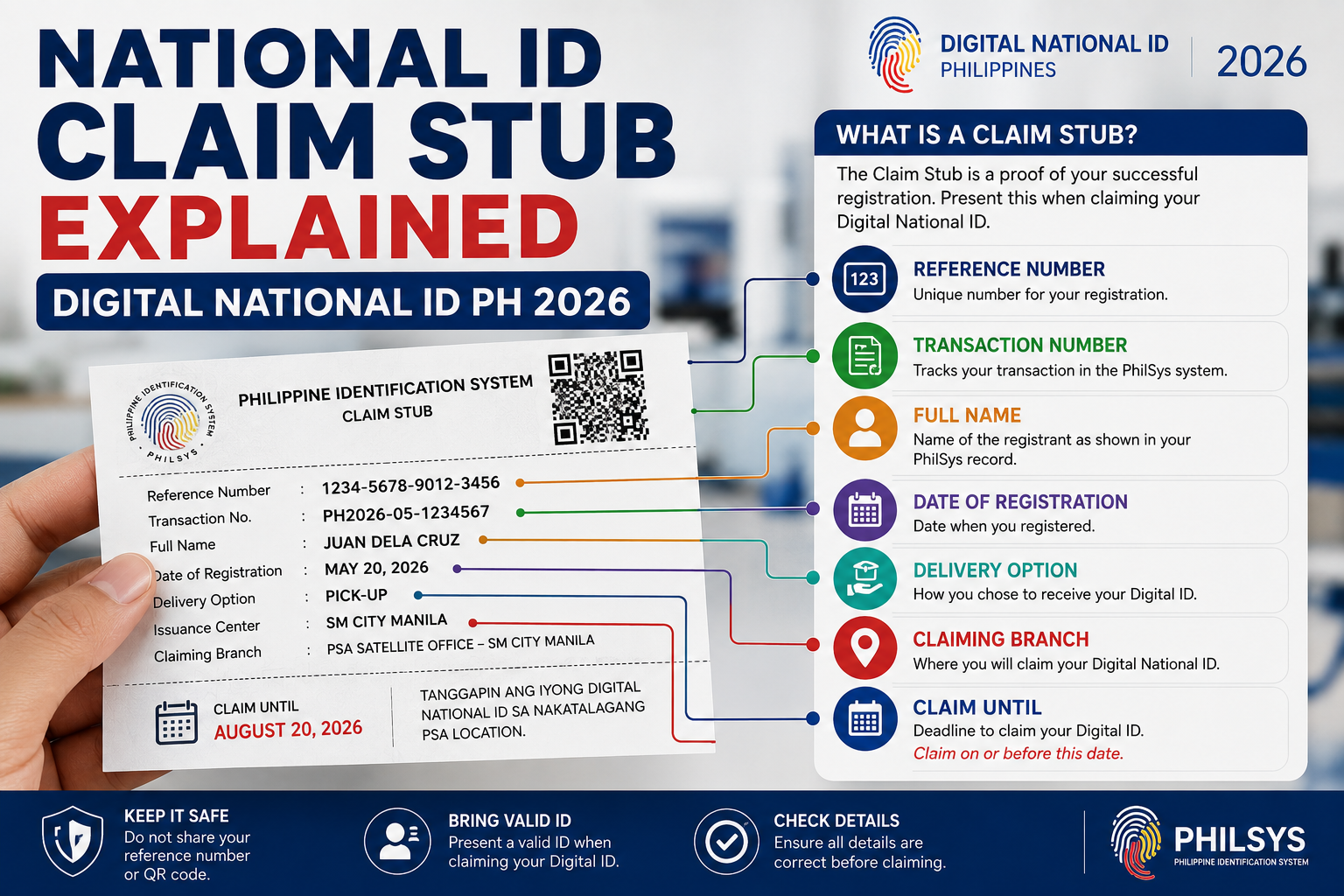
The National ID claim stub (officially called the PhilSys Transaction Slip) is a printed document you receive immediately after your biometric data — fingerprints, iris scan, and photograph — is captured at a PSA registration center. Here is what the slip typically contains:
| Field | Description | Why It Matters |
|---|---|---|
| Transaction Reference Number (TRN) | A unique 29-digit number (older slips may show 15 digits) | Required to track your PhilID delivery on the PHLPost portal and to claim your ePhilID |
| Full Name | Your registered name as encoded during Step 2 | Used by PHLPost to verify your identity upon delivery |
| Date of Registration | The exact date your biometrics were captured | Helps PSA locate your record if you need to retrieve your TRN later |
| Registration Center | The name and location of the PSA office or mall-based center where you registered | Useful if you need to return for TRN retrieval or corrections |
| Mailing Address | The address you provided for PhilID card delivery | This is where PHLPost will ship your physical card |
⚠️
Your PhilSys Number (PSN) — the permanent unique identification number assigned to you — is not printed on the transaction slip. The PSN is printed on the physical PhilID card itself and included in the sealed letter that accompanies your card upon delivery. Do not confuse the TRN with the PSN; they serve different purposes.
Why Is the National ID Claim Stub Important?
Your PhilSys transaction slip is more important than most people realize. Here are the four key reasons to keep it safe:
- Track your PhilID delivery status — The TRN on your claim stub is the only number accepted by the official PHLPost tracking portal. Without it, you cannot check whether your card has been printed, dispatched, or delivered. Read our full Track National ID Philippines guide for step-by-step tracking instructions.
- Claim your physical PhilID card — When PHLPost delivers your card, the courier will ask to see your transaction slip plus a valid ID as proof of identity before handing over the card. If you are not home, you can claim it at your local post office within 30 calendar days — again, the transaction slip is the primary document they ask for.
- Access your ePhilID or Digital National ID — Some PSA centers require your TRN to issue a printable ePhilID. The TRN is also used during eGovPH app setup to link your digital ID to your PhilSys record.
- Prove your registration — If your card is significantly delayed (some registrants wait months), the claim stub is your evidence that you completed the registration process. It can be useful when dealing with PSA inquiries, follow-ups, or when filing a request for your National ID tracking number.
How to Use Your Claim Stub to Track Your National ID
Once you have your National ID claim stub in hand, you can check the delivery status of your PhilID card in under a minute. Follow these steps:
- Locate your TRN — Find the 29-digit Transaction Reference Number printed on your claim stub. It is usually located right below your name. Older slips may show a 15-digit number — both formats work.
- Visit the PHLPost tracking portal — Open tracking.phlpost.gov.ph on your phone or computer. Do not use third-party tracking sites.
- Enter your TRN — Type or paste the full number into the tracking search box. Enter digits only with no spaces, dashes, or special characters.
- Click “Track” — The portal will display the current status of your card: whether it has been received at your local post office, is in transit, is out for delivery, or has already been delivered.
- Understand the result — If the status says “Not Found,” do not panic. It means your card has not yet been handed over to PHLPost and is still being printed or processed at the BSP facility. Check again after 2–4 weeks.
For a detailed breakdown of every PHLPost status code and what each one means, read the full Track Your National ID guide.
How to Claim Your PhilID Card Using the Claim Stub
When your physical PhilID arrives, you need to present documents to receive it. The process depends on how you receive the card:
If PHLPost delivers to your door
The postal carrier will attempt delivery up to three times at the mailing address you registered. When the carrier arrives, present your transaction slip along with any valid government-issued ID. The carrier will verify your name and ask you to sign the delivery receipt. You will receive your PhilID card inside a sealed PSA envelope that also contains a letter with your PSN and PhilSys Card Number (PCN).
If you need to pick it up at the post office
If all three delivery attempts fail, your card will be held at your designated local post office for 30 calendar days. Visit the post office and bring:
- Your PhilSys transaction slip (claim stub)
- A valid government-issued photo ID (passport, driver’s license, UMID, or voter’s ID)
- If sending a representative: an authorization letter plus valid IDs of both you and the representative
📬
PSA has confirmed that if you lost your transaction slip, you can still claim your PhilID by presenting any valid government-issued ID upon delivery. The carrier or post office staff can verify your identity against the PhilSys database. However, having the stub makes the process faster and avoids potential delays.
What to Do If You Lose Your National ID Claim Stub
Losing your PhilSys transaction slip is a common problem — especially since many people registered months or years ago. The good news: your PhilSys registration is not lost. Your biometric data and demographic information remain securely stored in the PhilSys database. Here is how to recover:
Step 1: Retrieve your TRN from PSA
Visit the nearest PSA PhilSys Registration Center (any center, not just the one where you originally registered) and bring a valid government-issued photo ID. The staff can look up your TRN using your full name and date of birth. This TRN retrieval service is free of charge.
Step 2: Contact PhilSys by email or phone
If visiting a center is not possible, email the PhilSys Registry Office directly at info@philsys.gov.ph with the following information:
- Full name (Surname, Given Name, Middle Name)
- Date of birth (Month/Day/Year)
- Sex
- Name of the PhilSys Registration Center where you registered
You can also call the official PhilSys Hotline at 1388 for assistance. Response times vary but email typically receives a reply within 5–10 business days.
Step 3: Claim your PhilID with a valid ID
Even without the transaction slip, you can still claim your physical PhilID when it arrives. The PSA has confirmed that presenting any valid government-issued ID is sufficient for PhilID acceptance if the claim stub is lost. PHLPost delivery personnel and post office staff can verify your identity against the PhilSys system.
📲
Even if you lost your claim stub, you may still be able to access your ePhilID or Digital National ID through the eGovPH app. If your mobile number is linked to your PhilSys record, the app can verify your identity through facial recognition — no TRN required.
National ID Claim Stub vs. Tracking Number — What Is the Difference?
Many Filipinos confuse the “claim stub” with the “tracking number.” Here is a clear comparison:
| Term | What It Means | Where to Find It |
|---|---|---|
| National ID Claim Stub | The physical paper document (transaction slip) issued after biometric registration — it is the entire slip, not just a number | Given to you at the PSA registration center after Step 2 |
| Transaction Reference Number (TRN) | The 29-digit (or 15-digit) tracking code printed on the claim stub — this is the number you type into the PHLPost portal | Printed on the claim stub, below your name |
| PhilSys Number (PSN) | Your permanent, unique identification number in the PhilSys database — used for all future transactions | Printed on the physical PhilID card and included in the delivery letter; not on the claim stub |
| PhilSys Card Number (PCN) | The card-specific number printed on the front of your PhilID — different from the PSN | Printed on the physical PhilID card only |
For a deeper explanation of the TRN and how to use it for delivery tracking, visit our National ID Tracking Number guide.
How to Keep Your National ID Claim Stub Safe
Since the transaction slip is a simple piece of paper, it can easily get lost, damaged, or faded over time. Follow these practical tips to protect your PhilSys claim document:
- Take a photo immediately after registration — Use your phone to photograph both sides of the transaction slip right at the center. This gives you a digital backup of your TRN even if the physical paper is lost.
- Write down your TRN separately — Copy the 29-digit TRN into your phone’s notes app, a notebook, or an email to yourself. Having the number stored in multiple places ensures you can always track your card.
- Store the original in a safe place — Keep the physical slip with your other important documents (birth certificate, passport, etc.) in a folder, envelope, or document organizer at home.
- Do not share your TRN publicly — Your TRN is linked to your personal PhilSys record. Do not post it on social media, share it in group chats, or give it to unverified third parties.
- Do not laminate the slip — Some registrants laminate the paper for protection, but this can make the thermal-printed text fade faster. A clear plastic sleeve or zip-lock bag is a better option.
Can You Still Claim Your National ID Without a Claim Stub?
Yes. The PSA has officially confirmed that you can claim your PhilID card even if you lost your transaction slip. The key requirement is presenting a valid government-issued photo ID that matches the name in your PhilSys record. The PHLPost carrier or post office staff can verify your identity against the PhilSys database.
However, without the claim stub, you cannot independently track your card’s delivery status online (since you need the TRN). To solve this, visit any PSA registration center with a valid ID and request a TRN retrieval — the service is free and takes just a few minutes.
Frequently Asked Questions About the National ID Claim Stub
What is a National ID claim stub?
It is the official transaction slip given to you by the PSA after completing biometric registration (Step 2) at a PhilSys center. It contains your full name, registration date, center location, mailing address, and your Transaction Reference Number (TRN) — a unique 29-digit code used to track and claim your physical PhilID card.
What should I do if I lost my National ID claim stub?
Visit the nearest PSA PhilSys Registration Center with a valid government-issued ID. The staff can retrieve your TRN from the PhilSys database using your name and date of birth, free of charge. You can also email info@philsys.gov.ph or call the PhilSys Hotline at 1388 to request your TRN.
Can I claim my National ID without the claim stub?
Yes. The PSA confirmed that you can receive your PhilID by presenting any valid government-issued photo ID when the PHLPost carrier delivers or when you pick up at the post office. The claim stub makes the process faster, but it is not the only accepted document.
Is the TRN the same as the PhilSys Number (PSN)?
No. The TRN (Transaction Reference Number) is a tracking code printed on your claim stub for delivery monitoring. The PSN (PhilSys Number) is your permanent identification number assigned by PSA, printed on the physical PhilID card — not on the claim stub. They serve completely different purposes.
How do I track my National ID using the claim stub?
Go to tracking.phlpost.gov.ph, enter the 29-digit TRN from your claim stub (no spaces or dashes), and click “Track.” The portal will show whether your card is in production, in transit, or ready for delivery. A “Not Found” result means it has not been dispatched yet.
Is there a fee to retrieve a lost TRN from PSA?
No. TRN retrieval at any PSA PhilSys Registration Center is free of charge. Just bring a valid government-issued ID so the staff can look up your record.
Can someone else claim my National ID with my claim stub?
Yes, but they need an authorization letter signed by you, a photocopy of your valid ID, and their own valid photo ID. Both the authorization letter and the IDs must match the records for the post office or PHLPost carrier to release the card.
How long should I keep my National ID claim stub?
Keep it until you have received your physical PhilID card and verified that all your details are correct. After that, the TRN is no longer needed for tracking, but the stub can still be useful as proof of your registration date if you need corrections or updates later. Storing a photo of it on your phone is a good long-term backup.