- PhilSys Hotline 1388: What to Know Before You Call
- What to Prepare Before You Contact PhilSys
- What PhilSys Can Help With by Phone or Email
- PhilSys Email: info@philsys.gov.ph
- Official PhilSys Facebook Page and Website
- If Your National ID Is Delayed, Lost, or Returned
- Scam Warning: Numbers and Offers That Are Not PhilSys
- Frequently Asked Questions
- Sources and Accuracy Note
| Channel | Details |
|---|---|
| Hotline | 1388 — fees apply, according to PSA notices |
| info@philsys.gov.ph | |
| Official website | philsys.gov.ph |
| Official Facebook | PSAPhilSysOfficial |
| PSA website | psa.gov.ph |
Contact details can change, so if 1388 does not connect, check the contact details on the official PhilSys website before trying a number you found on social media. Never use a number from a Facebook comment, a fixer, or a page offering “fast” National ID help for a fee.
PhilSys Hotline 1388: What to Know Before You Call
Hotline 1388 is the PhilSys Registry Office hotline published by the Philippine Statistics Authority (PSA). It is the number PSA itself lists in its press releases and public advisories for National ID questions and for reporting PhilSys-related fraud.
- Call from a phone you can be reached on. If the agent needs to call you back, they will need a working number.
- Call during office hours first. PSA does not publish a 24-hour promise for this line in the sources we checked. If you cannot get through, try again during working hours rather than paying a third party to “follow up” for you.
- Fees apply. PSA notices describe the hotline as a charged call. Keep the call short by having your details ready (see below).
- Do not share your full PhilSys Number (PSN) or passwords with anyone who calls you. PhilSys will not ask you to send money, buy load, or share a one-time password over the phone. If a caller does, hang up and report the number through the official channels.
What to Prepare Before You Contact PhilSys
Have these ready before you call 1388 or send an email. The agent cannot look up your record from your first name alone.
- Your full name exactly as registered, including middle name and suffix (Jr., Sr., III) if any.
- Your date of birth.
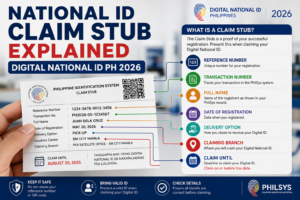
- Your transaction number (TRN) from your transaction slip, if you have it. If you lost it, say so — see our tracking guide and the TRN recovery tool on the National ID tools page before you call.
- Your PhilSys Card Number (PCN) or the number on your ePhilID, if you already have a card.
- The registration centre and date where you registered, if you remember them.
- A short, clear description of the problem in one or two sentences — for example, “I registered in Quezon City in March 2024 and my card has not arrived,” or “My card was returned to sender.”
- For email: put the problem in the subject line, for example “National ID delivery follow-up — [Your Full Name]”, and include the details above in the body. Do not attach a photo of your full ID unless PhilSys asks for it through an official channel.
What PhilSys Can Help With by Phone or Email
Contacting PhilSys is useful for questions and follow-ups. It is not a substitute for an in-person visit where one is required.
They can usually help with
- Where your National ID is in the process, and what the next step is.
- What to do if your card was returned to sender, or if delivery failed. See also our returned-to-sender guide.
- What documents you need for an update or correction, and which registration centres offer that service.
- How to report a lost National ID, a suspected scam, or unauthorised use of your details.
- General questions about the ePhilID, the Digital National ID, and where the National ID is accepted.
They cannot do these by phone or email alone
- Change your civil status, name, or address — these updates are submitted in person at a PhilSys Registration Centre with supporting documents.
- Issue a new card on the spot — a replacement or re-issued card follows the normal PhilSys process.
- Give you someone else’s record — PhilSys will not share another person’s National ID details with you, even if you are a relative.
- Speed up delivery by payment — there is no official “express” fee. Anyone offering faster delivery for money is not acting for PSA.
If the hotline tells you to visit a centre, ask which centre, what to bring, and whether you need an appointment — and write the answer down before you end the call.
PhilSys Email: info@philsys.gov.ph
Email is the better channel when your question needs documents or a written record — for example, a delivery complaint, a report of a scam message, or a question about a returned card.
Write a short email with: your full name, date of birth, TRN (if you have it), registration centre and date, and the problem in plain language. Attach only what is needed, and never send your full ID photo, your PSN, or your passwords in an unsolicited email.
Allow time for a reply. Email is not instant, and a second identical email does not make the first one faster. If your matter is urgent — for example, you suspect your identity is being misused — call 1388 as well and mention that you have emailed.
Official PhilSys Facebook Page and Website
For announcements, the official sources are the PhilSys website (philsys.gov.ph) and the Facebook page PSAPhilSysOfficial. PSA uses these channels for advisories about registration, ePhilID, delivery, and scams.
Be careful with look-alike pages. An official page will link back to philsys.gov.ph or psa.gov.ph. A page that offers to process your National ID through Messenger, asks for payment, or asks you to fill in a Google Form with your ID details is not official — even if it uses the PSA logo. PSA has warned repeatedly that it does not collect National ID updates through social media forms or house-to-house visits offering cash.
Do not post your full name, TRN, or ID photo in a public comment on any page, including the official one. If you need help with your own record, use the hotline or email instead.
If Your National ID Is Delayed, Lost, or Returned
Most people contact PhilSys for one of three reasons. Start with the guide for your situation before you call — it will tell you what the agent is likely to ask:
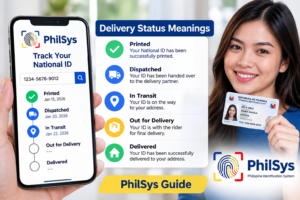
- Delayed delivery: check the delivery status guide and how to track your National ID. Have your TRN ready. Ask the hotline what the current status means and what the next step is — do not ask for a guaranteed delivery date, because PSA does not publish one for individual cards.
- Returned to sender: read the returned-to-sender guide first. You will usually need to confirm or correct your delivery address and ask where the card is now held.
- Lost National ID: report it and ask what to do next. Do not assume a replacement is automatic — ask whether you need an affidavit of loss and where to file for a replacement.
- Tracking is not working: see what to do when tracking is not working — the problem is often a wrong TRN format, a system delay, or a record that has not yet been encoded, not a lost application.
Scam Warning: Numbers and Offers That Are Not PhilSys
Scammers use the long wait for the physical National ID to target people. PSA has warned about all of the following:
- Calls, texts, or emails from people claiming to be PSA staff, offering to “fix” or “fast-track” your National ID for a fee.
- Google Forms or Messenger chats asking for your National ID photo, TRN, or personal details in exchange for an update or cash.
- House-to-house visits offering to photograph your IDs for money.
- Shops offering to print your Digital National ID on PVC or paper as an “official” card. PSA has said only PSA is authorised to print and issue the National ID, and the Digital National ID cannot be printed as a card.
If you receive one of these, do not pay, do not send documents, and report it to PhilSys through hotline 1388, email info@philsys.gov.ph, or the official Facebook page. Keep screenshots and the sender’s number or link for your report.
Frequently Asked Questions
What is the PhilSys contact number?
The PhilSys hotline is 1388, and the PhilSys email is info@philsys.gov.ph. The official website is philsys.gov.ph and the official Facebook page is PSAPhilSysOfficial.
Is the PhilSys hotline 1388 toll-free?
No. PSA notices describe hotline 1388 as a charged call — fees apply. Have your details ready before you call so the call is short.
What is the PhilSys email address?
info@philsys.gov.ph. Use it for written follow-ups, delivery complaints, and scam reports. Do not send your full ID photo or passwords in an unsolicited email.
Can PhilSys track my National ID by phone?
They can explain the status of your record and the next step, but they cannot give you a guaranteed delivery date, and they cannot issue a card by phone. Have your TRN ready — without it, a lookup is much harder.
How do I contact PhilSys if I lost my transaction number?
Call 1388 with your full name, date of birth, and registration details, and explain that you lost the slip. Also check the TRN recovery guidance on our National ID tools page before you call.
Can I update my National ID by calling PhilSys?
No. Civil-status, name, and address updates are submitted in person at a PhilSys Registration Centre with supporting documents. The hotline can tell you which centre offers the service and what to bring.
Where do I complain about a delayed National ID?
Start with the hotline (1388) or email (info@philsys.gov.ph), with your TRN and registration details. If your card was returned to sender, see the returned-to-sender guide first so you know what to ask.
Is there a PhilSys office I can visit instead of calling?
Yes. Use the PhilSys registration centres list to find a centre near you, and confirm by phone that it offers the service you need before you travel.
Sources and Accuracy Note
This guide is an independent guide from National ID Digital. We are not affiliated with the Philippine Statistics Authority (PSA) or PhilSys, and this article is general information, not legal advice. Contact details are taken from PSA’s own published notices, which list hotline 1388 and info@philsys.gov.ph as the PhilSys Registry Office contacts, with the official website philsys.gov.ph and Facebook page PSAPhilSysOfficial.
Contact details can change. If 1388 does not connect, verify the current details on philsys.gov.ph or psa.gov.ph before using a number from any other source.
Last reviewed: 11 November 2026. If an official PSA notice gives a different number or email, the official notice takes priority over this guide.
Related guides: How to Track Your National ID · National ID Tracking Not Working · National ID Delivery Status · National ID Returned to Sender · National ID Problems and Solutions · National ID Tools