- Table of Contents
- Why the National ID for Seniors is Crucial in 2026
- Dedicated Express Lanes for Seniors
- How to Register for the Senior National ID (Step-by-Step)
- Required Documents for Registration
- Overcoming Fingerprint Matching Issues
- Tracking Your Card and Accessing Digital Tools
- Frequently Asked Questions (FAQ)
Securing a national id for seniors in the Philippines is highly encouraged as the government works to streamline social services, pension distributions, and priority discounts. The Philippine Identification System (PhilSys) serves as the primary foundational identity document for all Filipinos. For our senior cardholders, having a National ID simplifies the process of verifying their identity at banks, drugstores, transit systems, and government offices, eliminating the need to present multiple secondary identification cards.
To support our older population, the Philippine Statistics Authority (PSA) has established priority guidelines to make the elderly registration process as comfortable and efficient as possible. From dedicated queue lanes at malls to mobile outreach programs for homebound individuals, registering for your card is highly streamlined. In this 2026 guide, we walk you through the benefits of the national id for seniors, the step-by-step registration workflow, required documentation, and tips for matching biometrics successfully.
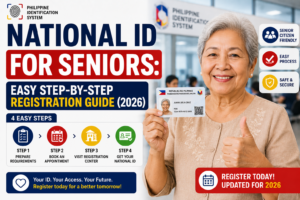
National ID for Seniors Easy Step-by-Step Registration Guide (2026)
Table of Contents
Why the National ID for Seniors is Crucial in 2026
Under the PhilSys Act (Republic Act No. 11055), the National ID is recognized as a valid primary identity document across both public and private sectors. For senior citizens, securing a national id for seniors offers several distinct advantages:
- Pension Distribution: Government entities like the Social Security System (SSS), Government Service Insurance System (GSIS), and the Department of Social Welfare and Development (DSWD) utilize the PhilSys database to verify pension recipients. Having your National ID linked to your account prevents pension suspensions and ensures secure payouts.
- Seamless Discounts: While the traditional OSCA (Office of the Senior Citizens Affairs) card remains valid, commercial establishments like pharmacies, restaurants, and transport companies are legally mandated to accept the National ID as proof of age to grant the standard 20% senior discount and VAT exemption.
- Healthcare Integration: PhilHealth and the Department of Health (DOH) utilize the PhilSys registry to identify beneficiaries for subsidized medical programs, free check-ups, and pharmaceutical assistance under the Universal Health Care Act.
By streamlining your records under a single database, the national id for seniors ensures you do not have to carry a bulky wallet filled with secondary cards just to access your daily privileges.
Dedicated Express Lanes for Seniors
One of the key hurdles for the elderly when dealing with government offices is standing in long lines. To solve this, the PSA mandates that all active registration centers must maintain dedicated priority lanes for senior citizens, pregnant women, and persons with disabilities (PWDs).
This means that for the elderly registration process, seniors do not need to secure online appointments in advance. They can simply walk into any participating mall registry site or municipal PSA center, present their senior document, and proceed directly to the priority lane. Furthermore, local government units (LGUs) frequently host mobile registration initiatives, bringing registration staff directly to barangay halls or senior centers so that elderly residents do not have to travel long distances.
For bedridden or severely ill seniors who cannot leave their homes, family members can contact their municipal PSA office to request a mobile home-visit registration. PSA personnel will visit the senior’s residence with portable biometric kits to complete their registration safely at home.
How to Register for the Senior National ID (Step-by-Step)
The registration process for senior citizens is designed to be straightforward and physically comfortable. If you are assisting an elderly relative, follow this workflow to complete their registration:
Step 1: Check Registration History
Ensure the senior has not already registered in an earlier phase. If they registered but lost their transaction slip, you can utilize online national id tools to check if their records are active or if they can download a digital version, saving them a trip to the registry center.
Step 2: Prepare Documents
Gather the physical documents needed to verify identity and age. You can review the official checklist of accepted national id requirements to ensure you have the correct primary or secondary documents ready.
Step 3: Go to a Local Registry Center
Visit the nearest PhilSys center during off-peak hours (usually mid-morning). Let the guard or receptionist know that you are assisting a senior citizen, and they will direct you to the dedicated express counter immediately.
Step 4: Fill Out the Demographic Form
Complete the PhilSys Registration Form. Family members are allowed to assist seniors who have difficulty writing or reading. Ensure all details, especially the birthdate and full name, match their supporting documents exactly.
Step 5: Capture Biometrics
The senior will step into the biometric booth where the operator will take a facial photo, scan their iris, and record their fingerprints. The booth is equipped with chairs so that seniors can remain seated comfortably throughout the capture process.
Step 6: Secure the Transaction Slip
The operator will hand you a transaction slip. Keep this slip in a safe place. You will need the transaction number to track delivery progress or access digital alternatives later.
Required Documents for Registration
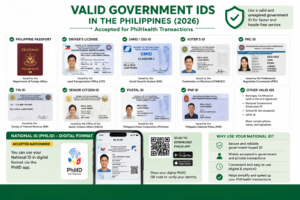
To secure a national id for seniors, you must present proof of identity showing your full name, birthdate, and citizenship. The table below lists the most common documents accepted at the express counter:
| Document Category | Primary Documents (Highly Recommended) | Secondary Supporting Documents |
|---|---|---|
| Identity & Age Proof | Valid Philippine Passport or OSCA Senior Citizen Card | PSA Birth Certificate or Barangay Clearance with photo |
| Government-Issued Cards | GSIS or SSS UMID Card | Voter’s ID, Postal ID, or PRC ID |
| Residency Proof | Barangay Certificate of Residency | Recent Utility Bill showing the senior’s address |
| Health & Benefits | PhilHealth ID (showing member photo) | PAG-IBIG/HDMF ID or Senior Discount Booklet |
For more detailed information on alternative supporting documents, check out our comprehensive guide on national id requirements. Bringing at least two secondary documents is recommended if a primary passport or OSCA card is unavailable.
Overcoming Fingerprint Matching Issues
A common technical challenge during the elderly registration process is capturing clean fingerprint scans. As people age, their skin loses elasticity, and the ridges on their fingertips can become worn down, faint, or dry. This often leads to fingerprint matching errors on automated scanners.
Fortunately, the PSA has established protocols to handle a philsys fingerprint issue seniors may experience:
- Dry Skin Treatment: Registry operators are equipped with moisturizers, glycerin, or sanitizing wipes. Moisturizing the fingertips slightly before scanning makes the ridges stand out, allowing the scanner to capture a clean image.
- Iris Scanning: If a senior’s fingerprints are too worn out to register, the operator will rely heavily on the iris scan. The iris pattern is highly unique and does not degrade with age, serving as a reliable biometric alternative.
- Operator Overrides: The PhilSys software allows operators to bypass failing fingerprint scans after multiple attempts, substituting them with verified iris scans and facial matching. Rest assured, a senior citizen will not be rejected or denied registration simply because their fingerprints are worn down.
Tracking Your Card and Accessing Digital Tools
After completing the registration, the physical card is printed and queued for delivery. Because printing backlogs can cause shipping delays, you can monitor the status of the card online.
Simply use the transaction code printed on the registration slip to check the shipping status on our postal tracking guide to track your national id in the Philippines. This helps you monitor when the card is turned over to PHLPost for door-to-door delivery.
Additionally, if the senior needs a valid identity document immediately, family members can help them download the official eGovPH mobile app. By entering the senior’s registration details and completing a live face scan, you can generate a digital National ID. This digital card features a dynamic QR code that carries the exact same legal validity as the physical card, letting them access senior discounts and bank services instantly. Explore other download options using our list of online national id tools.
Frequently Asked Questions (FAQ)
Is the National ID registration free for senior citizens?
Yes. The registration process for the national id for seniors is completely free of charge. The government does not collect any fees for demographic profiling, biometric capture, or the delivery of the physical polycarbonate card. Be cautious of scams charging fees for online booking or fast-track printing.
Can seniors register without an appointment?
Yes. Under PSA guidelines, senior citizens are eligible to use the dedicated priority lanes at all PhilSys registration centers. They do not need to secure an online booking in advance; they can simply walk in with their supporting documents and proceed directly to the express counter.
Does the National ID replace the OSCA Senior Citizen Card?
No. The National ID does not replace the OSCA Senior Citizen Card. Rather, they complement each other. The National ID acts as a primary, government-wide proof of identity and age, which establishments are legally required to accept for senior discounts. The OSCA card remains valid and continues to be issued by local municipalities.
What if a senior citizen is bedridden or cannot travel?
For bedridden, severely ill, or disabled senior citizens who cannot travel to a registration center, the family can request assistance from their local LGU or municipal PSA office. The PSA conducts mobile registration outreach programs and can schedule home visits to capture biometrics using portable registration kits.
What happens if a senior’s fingerprints cannot be captured?
If a senior’s fingerprints are worn down or unreadable, the operator will use moisturizers to improve ridge visibility. If scanning still fails, the system allows the operator to bypass the fingerprint step, relying instead on the iris scan and facial photo to verify identity. The application will proceed normally.