- What Is a National ID Tracking Number?
- Where Can You Find National ID Tracking Information?
- What Information Is Needed to Track a National ID?
- How Is a Tracking Number Used?
- What If Your Tracking Number Does Not Work?
- What If You Cannot Find Your Tracking Information?
- Tracking Number vs National ID Number
- Frequently Asked Questions
National ID Tracking Number: Where to Find It
Last updated: Sept 2026
National ID tracking number Philippines — if you’ve been searching for this, you’re probably wondering where your physical PhilID card is and how to check its delivery status. You’re not alone. Thousands of Filipinos ask the same question every day.
Quick answer: There is no single “tracking number.” You’ll use one of two different references depending on your stage: your Transaction Reference Number (TRN), found on your Step 2 transaction slip, on the PSA PhilSys portal — or your PHLPost parcel number, sent via SMS once your card ships, on the PHLPost website. They are not interchangeable.
Here’s the honest truth: there isn’t just one “tracking number.” The Philippine National ID system uses different reference numbers at different stages. This guide will walk you through exactly what each number is, where to find it, and how to use it — in plain, simple language.
What Is a National ID Tracking Number?
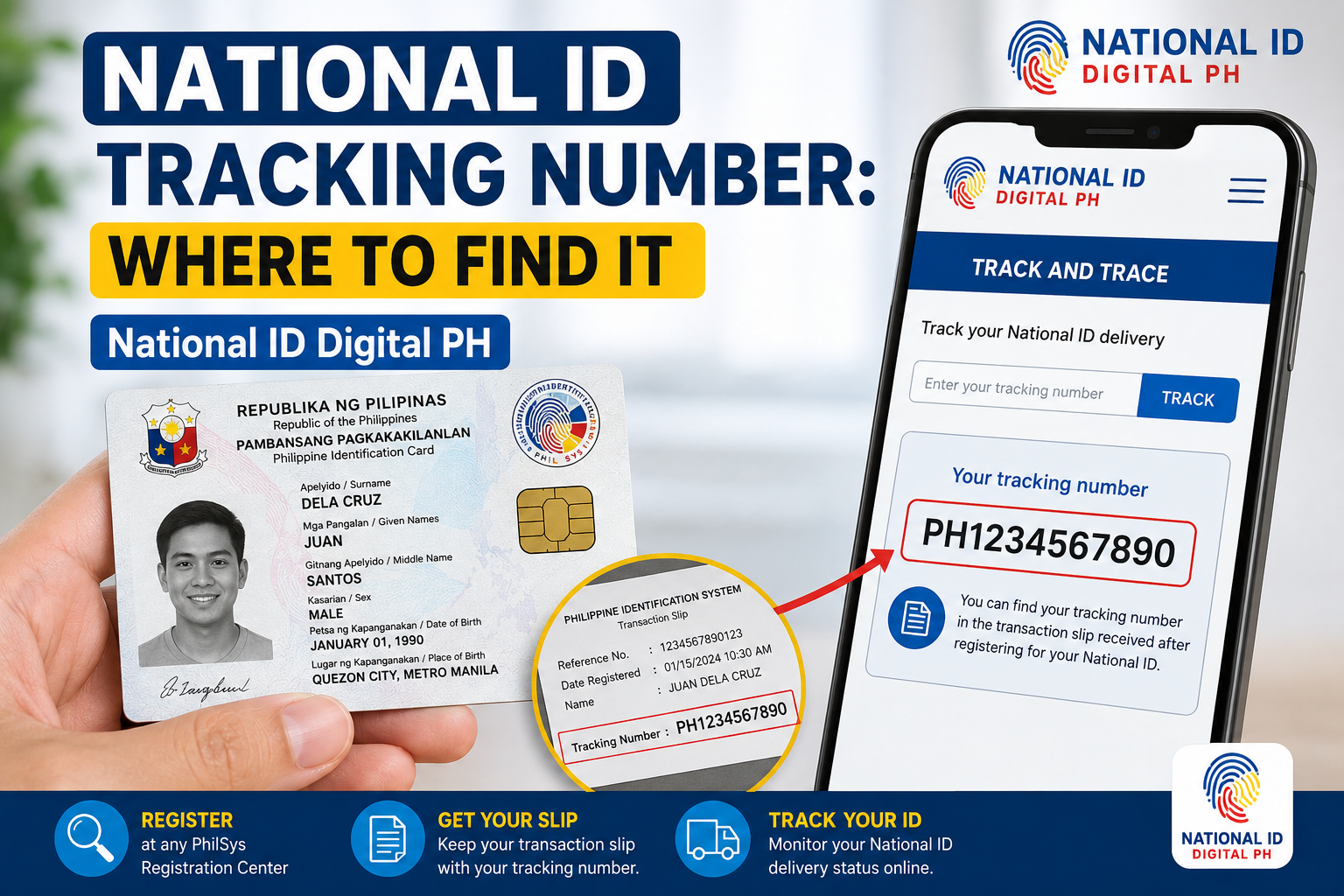
A National ID tracking number is the reference information you use to check the delivery status of your physical PhilID card. In the PhilSys system, applicants encounter two distinct types of reference information:
- Transaction Reference Number (TRN) or PhilSys Common Reference Number (CRN): This appears on the transaction slip you receive after your Step 2 biometrics appointment. You use this on the PSA PhilSys tracking portal to check if your card has been printed and handed off for delivery.
- PHLPost parcel tracking number: A separate number sent via SMS after your card has been dispatched to the postal service. This is used on the PHLPost website for courier-level tracking.
Important: These are not the same number. Your TRN tracks production and handover. Your PHLPost number tracks physical delivery. Using the wrong number on the wrong portal is the most common reason tracking appears not to work.
Where Can You Find National ID Tracking Information?
Where you find your National ID tracking number Philippines depends on which stage your application is in and which type of reference you’re looking for.
Transaction Reference Number (TRN) or CRN
This is typically found on the transaction slip you received after your Step 2 biometrics appointment at the registration centre. It may be handwritten or printed. Look for labels like “Transaction Reference Number,” “TRN,” “PhilSys CRN,” or a similar alphanumeric code.
If you registered through the eGovPH app, the reference number may also appear in the app or in a confirmation email.
PHLPost Parcel Tracking Number
This number is sent via SMS by PHLPost after your National ID card has been dispatched for delivery. It is not available on your transaction slip. You will only receive this number once your card reaches the courier stage. Check the mobile number you provided during registration.
If you’re unsure which number to use or where to enter it, our National ID tracking guide walks through the complete process step by step.
What Information Is Needed to Track a National ID?
To perform a National ID tracking number lookup, the specific reference you need depends on which tracking portal you are using:
- PSA PhilSys portal: Requires your Transaction Reference Number (TRN) or PhilSys Common Reference Number (CRN). You cannot search by name, date of birth, or other personal details.
- PHLPost parcel tracking: Requires the PHLPost tracking number sent to you via SMS. This is a separate courier reference and will not work on the PSA portal.
There is no single “delivery reference number” that works across both systems.
How Is a Tracking Number Used?
You use your National ID delivery tracking number to check the progress of your PhilID card through the production and delivery pipeline. Here is the typical flow:
- After Step 2 registration: Use your TRN/CRN on the PSA PhilSys portal to see if your card has been printed and handed to PHLPost. Statuses like “For Printing” or “Dispatched” appear here.
- After receiving an SMS: Once you receive a PHLPost tracking number, use it on the PHLPost website to see detailed courier updates — such as “In Transit,” “Out for Delivery,” or “Delivered.”
- Throughout the process: Refer to our National ID status codes guide to understand what each status update means.
What If Your Tracking Number Does Not Work?
A National ID tracking number not working is a common frustration. Here are the most likely reasons and what to check:
- You’re entering the number on the wrong portal. A TRN will not work on the PHLPost site, and a PHLPost number will not work on the PSA portal.
- The number is mistyped. Handwritten TRNs can be hard to read — characters like “0” and “O”, “1” and “l”, or “5” and “S” are easily confused.
- Your record hasn’t been uploaded yet. After Step 2, it can take weeks or months for your data to appear in the PSA tracking system.
- The portal is temporarily down. Both the PSA and PHLPost websites experience downtime, especially during peak hours.
If you’ve checked all of the above and tracking still isn’t working, our guide on what to do if National ID tracking is not working covers additional troubleshooting steps.
What If You Cannot Find Your Tracking Information?
If you don’t know where to find your National ID tracking number because you’ve lost your transaction slip or never received an SMS, here are your options:
Lost Transaction Slip (TRN/CRN)
Visit the PSA registration centre where you completed your Step 2 appointment. Bring a valid government-issued ID. The staff can look up your record and provide your reference number. You cannot retrieve your TRN online using only your name.
No PHLPost SMS Received
First, check the PSA portal using your TRN. If your status shows “Dispatched” but you haven’t received an SMS, the message may have been delayed or blocked. You can also contact PHLPost customer service or visit your local post office with a valid ID. Our PhilPost tracking guide has more details.
Tracking Number vs National ID Number
These two concepts are often confused. Here’s the clear difference:
| Tracking / Reference Number | National ID Number (PhilSys Number) |
|---|---|
| Used to track production and delivery of your physical card | Your permanent 12-digit identification number assigned by PhilSys |
| Found on your transaction slip (TRN) or sent via SMS (PHLPost) | Printed on your physical PhilID card and your digital ePhilID |
| Temporary — only relevant until you receive your card | Permanent — your official government ID number for life |
You cannot use your PhilSys Number to track your card delivery. Only the TRN, CRN, or PHLPost tracking number serve that purpose. For more on checking your delivery progress, visit the track your National ID page.
Frequently Asked Questions
Q: What is a PhilSys tracking number? It’s the reference number used to check your National ID delivery status — typically your Transaction Reference Number (TRN) for the PSA portal, or the PHLPost parcel number for courier tracking.
Q: Can I track my National ID using only my name? No. The PSA portal requires a TRN or CRN. You cannot search by name or birthdate. If you’ve lost your reference number, visit your registration centre with a valid ID.
Q: I received an SMS with a tracking number — where do I use it? That SMS contains your PHLPost parcel tracking number. Use it on the official PHLPost website, not the PSA portal. See our PhilPost tracking guide for step-by-step help.
Q: Is the TRN the same as the National ID number? No. The TRN is a temporary reference for tracking your application. Your National ID number is your permanent 12-digit PhilSys Number printed on your card.
Q: How do I track my National ID using a tracking number? Determine which number you have: TRN → use the PSA PhilSys portal. PHLPost number → use the PHLPost website. Full instructions are in our National ID tracking guide.
Disclaimer: NationalIDDigital.ph is an independent resource. We are not affiliated with the PSA, PhilSys, or PHLPost. Always verify details with official government channels.